Site Health Monitoring
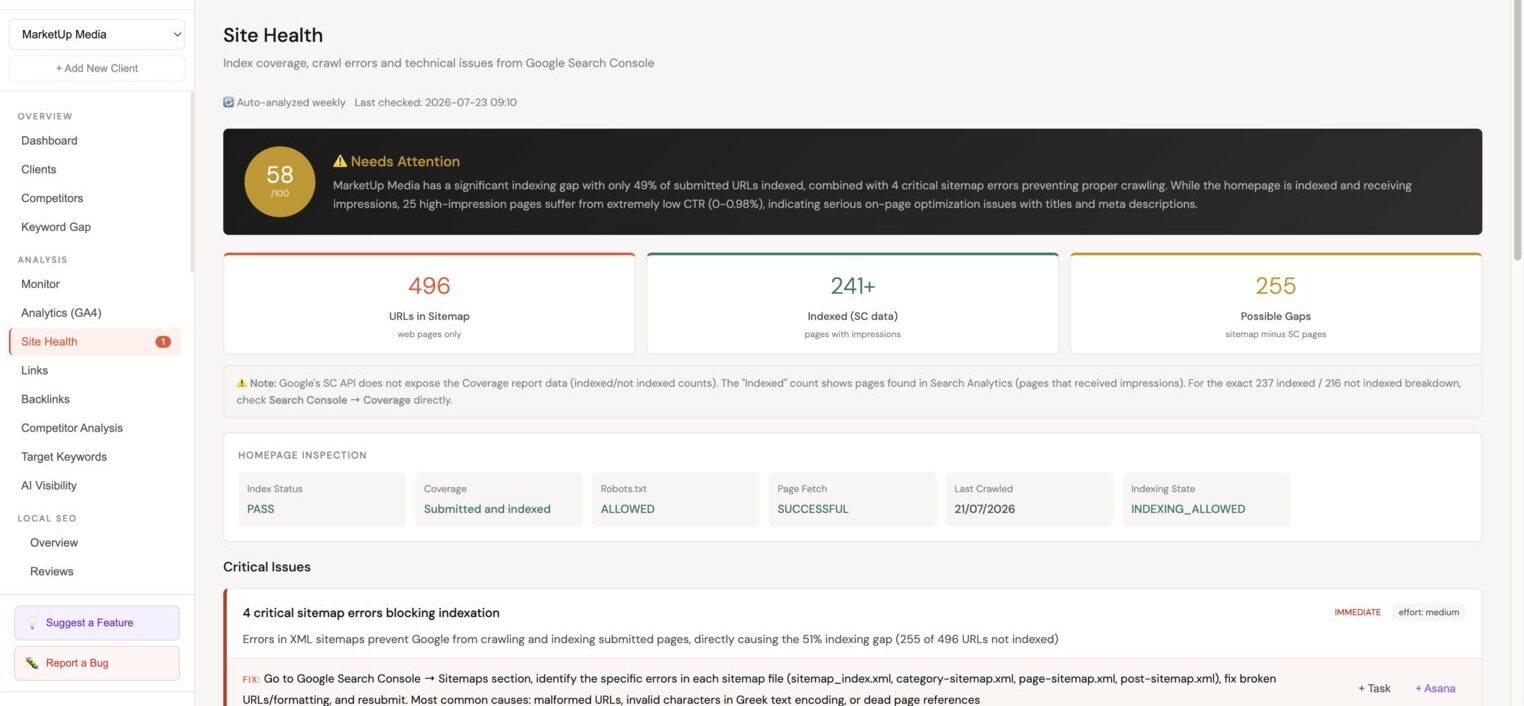
The Site health module runs an automated weekly analysis of the client's WordPress site and surfaces technical SEO issues with an overall health score, AI recommendations, and direct task creation buttons.
How site health works
Minorank runs an automated crawl and health check once per week. The analysis covers:
- URLs listed in the site's XML sitemap
- Pages indexed in Google (via GSC data)
- Technical SEO signals from the Minorank plugin (when connected)
- Core Web Vitals and PageSpeed data
You can trigger a manual run at any time from Site health → Run now.
Overall score
The health score (0–100) reflects the proportion of issues found relative to the total pages analysed. A score above 80 is generally healthy. Below 60 indicates significant issues requiring attention.
Sitemap vs indexed
Two key numbers at the top of the page:
- URLs in sitemap, how many pages the site is actively submitting to Google
- Indexed URLs, how many of those pages Google has actually indexed (from GSC data)
A large gap between these numbers indicates indexation issues, pages being submitted but not indexed, which could signal crawl budget problems, thin content, or technical barriers.
Issue categories
Issues are grouped by severity:
| Severity | Description |
|---|---|
| Critical | Issues that directly harm indexability or rankings, fix immediately |
| Warning | Issues that may harm performance or user experience |
| Info | Best-practice improvements, lower urgency |
Technical SEO checks
- Broken internal links (4xx responses)
- Redirect chains (3+ redirects to reach destination)
- Pages blocked by robots.txt
- Missing HTTPS
- Non-canonical pages in sitemap
- Pages with noindex that are in the sitemap
Content checks
- Missing meta titles
- Missing meta descriptions
- Duplicate meta titles across pages
- Duplicate meta descriptions across pages
- Thin content pages (under 300 words)
- Missing H1 headings
- Multiple H1 tags on a single page
Image checks
- Images missing alt text
- Oversized images (over 500KB)
Quick wins
The Quick wins section highlights the easiest issues to fix that will have the most SEO impact. These are pre-ranked by effort vs impact ratio. Each quick win has:
- A clear description of the issue
- The number of affected pages
- A Task button to create a task for this fix
- An Asana button to push directly to Asana
AI recommendations
Below the issue list, Minorank generates AI-written recommendations tailored to the specific issues found on this site, not generic SEO advice. Each recommendation explains:
- What the problem is
- Why it affects rankings
- What to do about it
- Expected impact
Each recommendation has a Task button and an Asana button.
Crawl history
Each weekly crawl is saved. Use the Crawl history dropdown to compare the current results to any previous crawl, useful for confirming that fixes resolved the issues you addressed.
:::tip Client reporting The site health score and issue summary make excellent additions to client reports. The colour-coded severity breakdown communicates site quality clearly without requiring technical explanation. :::
Next steps
- Internal Links Analysis, orphaned pages, link equity, and internal linking recommendations
- WordPress SEO Management, fix missing meta tags directly via Meta Manager
- Tasks, manage site health action items