Installing Minorank SEO
Minorank SEO is a free WordPress plugin available from WordPress.org. Installation takes under two minutes and requires no configuration to start using.
Requirements
| Requirement | Version |
|---|---|
| WordPress | 6.0 or higher |
| PHP | 8.0 or higher |
| WooCommerce | Optional, 3.0+ enables product sitemaps and Product schema |
Installation
From WordPress.org (recommended)
- In your WordPress admin, go to Plugins → Add New.
- Search for Minorank SEO.
- Click Install Now, then Activate.
Manual installation
- Download the plugin zip from WordPress.org.
- Go to Plugins → Add New → Upload Plugin.
- Upload the zip file and click Install Now, then Activate.
What happens on activation
When the plugin activates for the first time, it automatically:
- Creates two database tables:
minorank_404sandminorank_redirections - Generates a unique 32-character IndexNow key
- Registers rewrite rules for the XML sitemap, LLMs.txt, and IndexNow key file
- Adds the Minorank SEO top-level menu to the WordPress admin
:::note No configuration required The plugin works immediately after activation. You do not need to configure anything to start using the meta box in the Gutenberg editor. :::
Navigating the plugin
After activation, Minorank SEO appears in the left WordPress admin menu with three sub-pages:
| Page | What it does |
|---|---|
| SEO Settings | API key, XML sitemap, LLMs.txt, IndexNow, Schema, Local Business |
| Redirections | Create and manage 301/302/307/410/451 redirects |
| 404 Monitor | View and act on all logged 404 errors |
The Gutenberg editor sidebar gains a Minorank SEO panel with four tabs (General, Advanced, Schema, Social) on every post, page, and custom post type.
SEO Settings overview
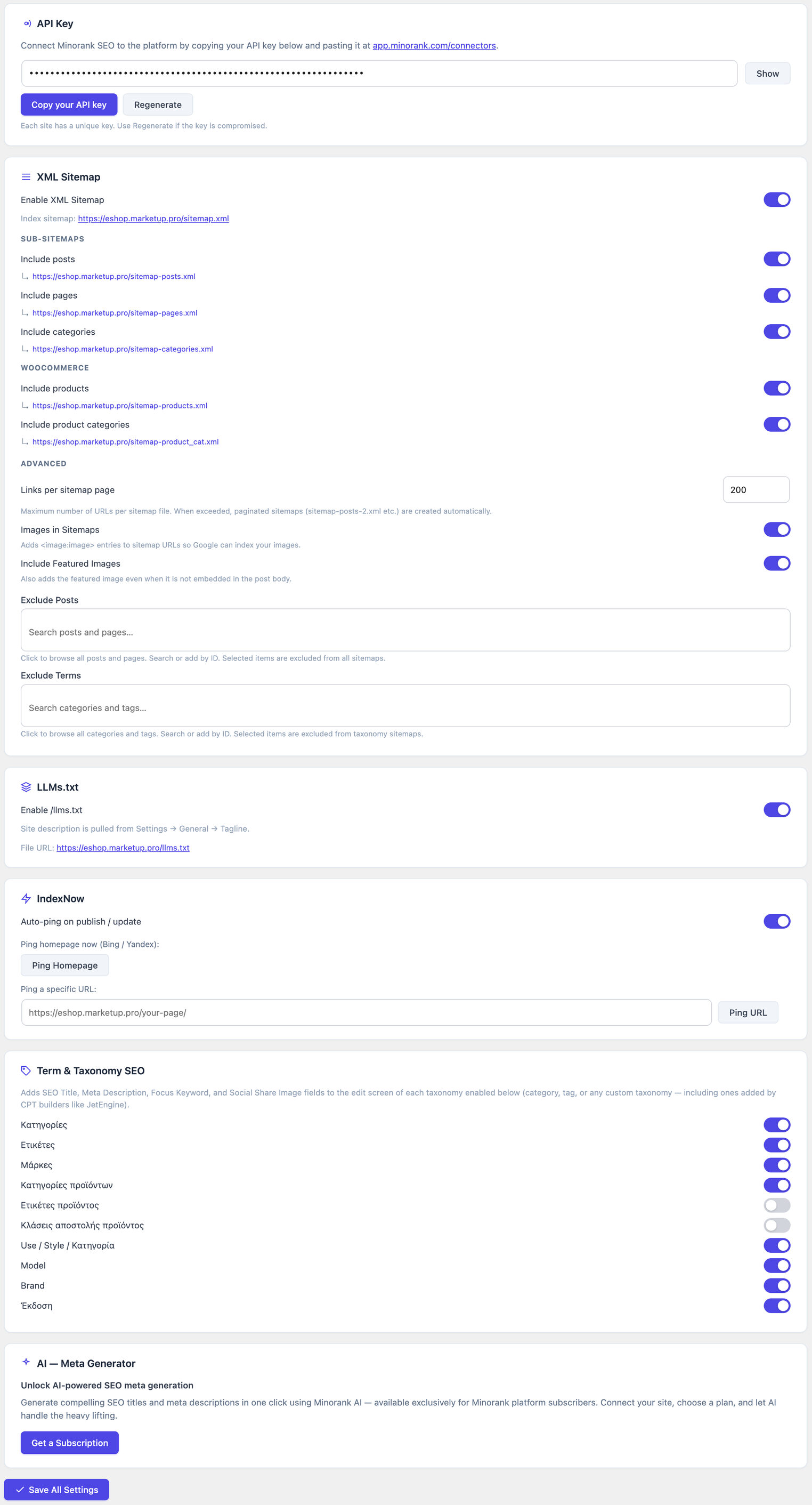
The Settings page is divided into sections:
API Key
Paste your Minorank Platform API key here to connect the plugin to the platform. Click Test Connection to verify. The connection status badge updates to Connected (green) or shows an error.
The API key is optional, the plugin works fully without it. The key is only needed to allow the Minorank Platform to manage this site remotely.
XML Sitemap
Toggle individual post type sitemaps on or off. When enabled, the sitemap URL for each type appears as a clickable link, copy it directly into Google Search Console.
LLMs.txt
Toggle to generate a /llms.txt file following the llmstxt.org spec, allowing AI crawlers (ChatGPT, Claude, Gemini) to understand your site's purpose and structure.
IndexNow
Enable auto-ping on publish, and manually ping your homepage or specific URLs from this section.
Schema Markup
Set the default JSON-LD @type for each content type. Individual posts can override these defaults from the Schema tab in the meta box.
Local Business Schema
Fill in your business details (name, phone, email, address, price range) to add a LocalBusiness JSON-LD block to your homepage automatically.
Connecting to Minorank Platform (optional)
To allow the Minorank Platform to manage this site's SEO remotely:
- In the Platform: go to Connectors → WordPress → Add site and enter the site URL, username, and application password. The platform generates an API key for this site.
- In WordPress: go to Minorank SEO → Settings → API Key, paste the key, and click Save Key.
- Click Test Connection, the badge should update to Connected.
Once connected, meta tags, redirections, and 404 data on this site are accessible from the Minorank Platform's WordPress SEO management section.
Next steps
- SEO Meta Box, use the 4-tab Gutenberg sidebar for per-post SEO
- Content Analysis, real-time SEO scoring as you write
- Redirections, manage all site redirections
- Migration, import from Rank Math or Yoast SEO