Redirections
The Minorank SEO redirections manager gives you full control over all site redirects from a single WordPress admin page. Redirections fire before WordPress loads any templates, so they add zero overhead to unaffected page requests.
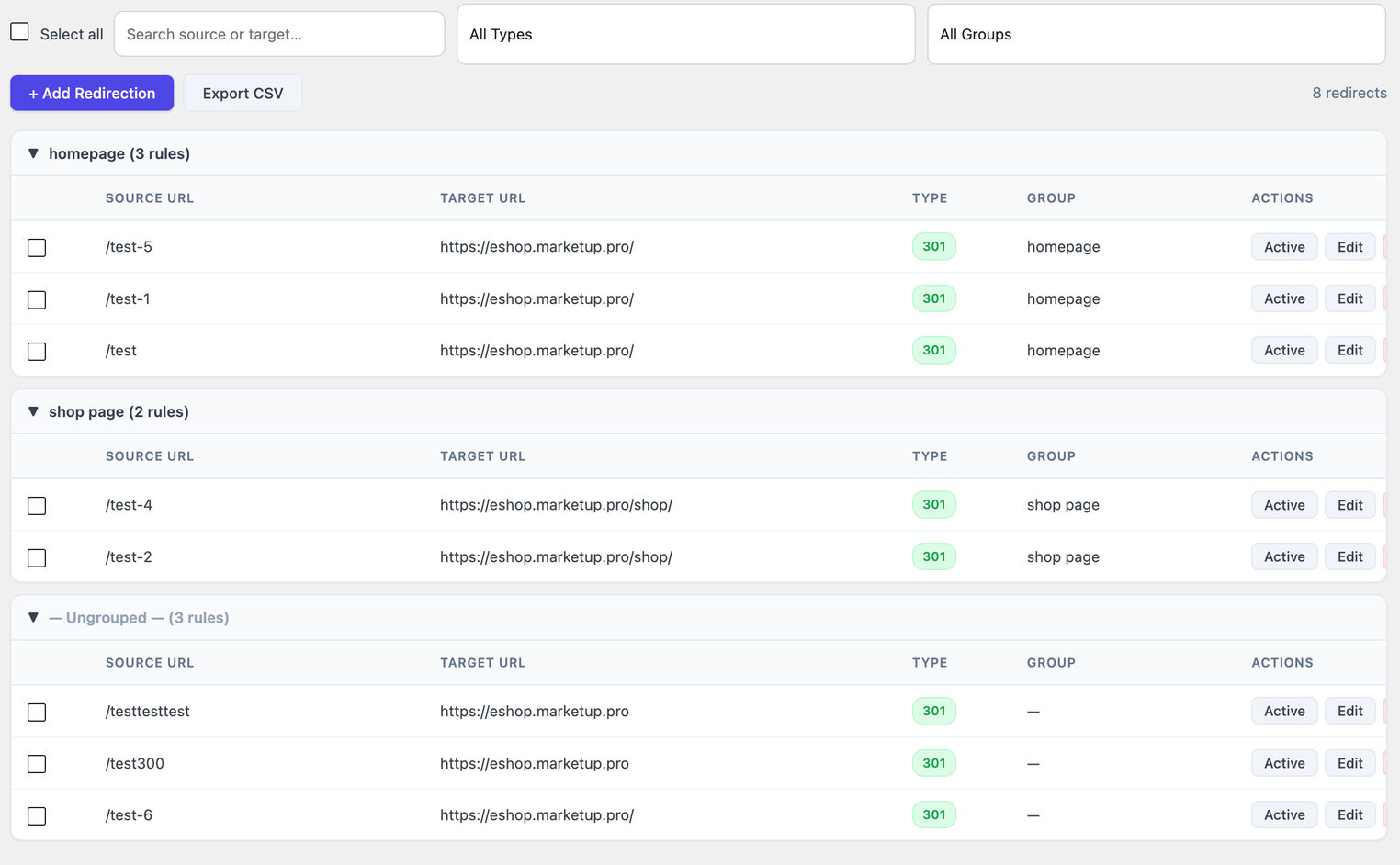
Redirect types
| Code | Name | Location header | When to use |
|---|---|---|---|
| 301 | Moved Permanently | Yes, passes full SEO value | Page permanently moved to a new URL |
| 302 | Found (Temporary) | Yes, SEO value stays on source | Temporary maintenance redirect |
| 307 | Temporary Redirect | Yes, method-preserving (POST stays POST) | Temporary redirect where form submissions must reach the original URL |
| 410 | Gone | No, no destination needed | Page permanently deleted with no replacement |
| 451 | Unavailable For Legal Reasons | No, no destination needed | Content removed due to legal requirements |
Use 301 for permanent changes. Use 302 or 307 only when the move is genuinely temporary. Use 410 rather than letting deleted pages return 404, 410 signals intentional deletion to search engines and helps them remove the page from the index faster.
Adding a redirect
- Go to Minorank SEO → Redirections.
- Click + Add Redirection.
- Fill in the modal:
| Field | Notes |
|---|---|
| Source URL | Path only, e.g. /old-page/. Do not include the domain. |
| Target URL | Path or full URL. Not required for 410 and 451 types. |
| Redirect Type | 301, 302, 307, 410, or 451 |
| Group Name | Optional. Groups organise redirects (e.g. homepage, migration-2025). Autocompletes from existing group names. |
| Enabled | Toggle on/off without deleting the redirect. |
- Click Save.
Filter bar
| Control | Purpose |
|---|---|
| Search | Live-filter by source URL or target URL, no page reload |
| All Types | Filter by redirect type (301, 302, 307, 410, 451) |
| All Groups | Filter by group name |
| Count badge | Shows how many redirects match the current filters |
Table columns
| Column | Description |
|---|---|
| Source URL | The path being redirected |
| Target URL | The destination URL |
| Type | Colour-coded badge: 301 (green), 302, 307, 410, 451 |
| Group | Group label (if set) |
| Actions | Active toggle, Edit, Delete |
Bulk delete
Select any rows using the checkboxes (or the header checkbox to select all rows matching the current filters), then click Delete Selected in the bulk bar that appears.
CSV bulk import
To import a large number of redirects at once:
Prepare a CSV file with these columns:
source,target,type,group_name
/old-page/,/new-page/,301,migration
/another-old/,/another-new/,301,migration
/deleted/,,410,
Notes:
sourceandtypeare requiredtargetis required for 301, 302, 307, omit for 410 and 451group_nameis optional- Do not include a header row
Import via Minorank SEO → Redirections → Import CSV and upload the file. Duplicate source URLs are skipped automatically.
Groups
Groups are optional labels for organising redirects. Useful for:
- Migration projects, group all redirects from a domain migration
- Seasonal pages, group redirects that are toggled on/off seasonally
- Page type, separate product redirects from blog redirects
Filter by group name to view only that group's redirects. Bulk-enable or bulk-disable a group by filtering to it and using the select-all checkbox + toggle.
Performance note
Redirections are stored in a dedicated database table and loaded into memory once per PHP request (not once per redirect check). On sites with thousands of redirects, this is significantly more efficient than redirections stored as post types or options.
Redirect health check
Click Check for Issues on the Redirections page to run a one-click scan that detects:
- Redirect loops, where redirect A points to B and B points back to A (including self-redirects where a source redirects to itself)
- Redirect chains, where a visitor must follow two or more hops to reach the final destination (e.g.
/old/redirects to/middle/which redirects to/new/)
Results are shown inline in the table. Fix loops by correcting the target URL. Fix chains by pointing the first redirect directly to the final destination.
Redirect target picker
When adding or editing a redirect, the Target URL field includes a searchable picker. Type a page title, post title, product title, SKU, or taxonomy term name and the picker returns matching results grouped by content type. Click a result to fill in the correct URL automatically.
Each content type gets its own share of results so large product catalogs do not crowd out pages or posts.
Next steps
- 404 Monitor, create redirects directly from logged 404 errors
- REST API, manage redirections programmatically via the API
- WordPress SEO Management, manage redirections for all client sites from the Minorank Platform